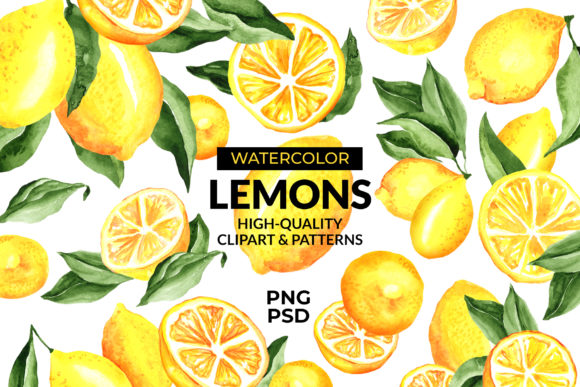
Lemon Watercolor Clipart Patterns
When you’re building a visual identity for a food brand, a cosmetic line, or even just a seasonal social media campaign, the quality of your design assets can make or break the final result. Generic clipart feels flat, while hand-drawn or painted elements add warmth and authenticity. Lemon watercolor clipart patterns bridge that gap beautifully: they offer the organic, soft texture of watercolor painting with the precision and repeatability that modern design workflows demand.
This particular set includes 12 individual lemons, 8 lemon leaves, 10 lemon branch compositions, a layered PSD file sized at 8692x6910 pixels at 300 dpi, and three seamless patterns (each 3600x3600 pixels at 300 dpi). Knowing how to integrate these assets into your process—whether you’re a graphic designer, a small business owner, or a content creator—can save you hours of manual work and elevate the consistency of your output.
Where Lemon Watercolor Clipart Patterns Fit in a Real Workflow
Design projects rarely follow a straight line from idea to finished product. You research, sketch, gather assets, build layouts, iterate, and finalize. Lemon watercolor clipart patterns slot into several stages of that cycle, not just the final polish.
During the planning and mood-boarding phase, the seamless patterns can be used as background textures in conceptual mockups. Instead of spending time creating your own watercolor effect from scratch, you can drop in one of the three patterns to test how a citrus-inspired palette feels against product packaging or website backgrounds. The layered PSD is particularly useful here: you can rearrange leaves, lemons, and branches to create a custom composition that reflects the mood of your brand before committing to a final direction.
In the active production stage, the individual lemon and leaf elements become building blocks. The 12 lemons vary in angle, ripeness, and slice detail, while the 8 leaves offer different veins and color gradients. The 10 branch compositions provide ready-made clusters that work well as corner accents or repeating motifs. Because the PSD is layered, you can hide, duplicate, or recolor elements without degrading the image quality. This flexibility is critical when you need to produce multiple variations for A/B testing or different product lines.
After the core design is locked, the seamless patterns serve a separate purpose: they ensure visual consistency across touchpoints. A pattern used on a soap label can be repeated on a shopping bag, a website header, and a social media tile, all without visible seams or resolution loss. The 3600x3600 pixel dimensions at 300 dpi give you enough surface area to tile the pattern over large print items like tablecloths, posters, or gift wrap.
Interacting with Other Tools, Platforms, and Assets
Lemon watercolor clipart patterns aren’t meant to work in isolation. They integrate with the software and resources you already rely on. The layered PSD opens natively in Adobe Photoshop and is compatible with Affinity Photo, GIMP, and other software that supports the format. Because each element is on its own layer (or grouped logically), you can bring the file into layout tools like InDesign or Canva after flattening selected groups, or export individual PNGs for use in drag-and-drop editors.
The provided PNGs (lemons, leaves, branches) have transparent backgrounds, so they slot directly into mockup templates, video overlays, or presentation decks without additional masking. For web designers, these PNGs can be optimized for the web while retaining the watercolor texture—just resize as needed within a tool like Figma or Sketch while keeping the 300 dpi original for print.
If you work with a branding style guide, you can sample colors from the watercolor set to build a matching swatch palette in your design software. The natural yellow-green spectrum of the leaves and the variety of lemon yellows (from pale to deep gold) provide a warm, organic palette that works well with neutral backgrounds or other botanical elements. This reduces the friction of color matching when combining the clipart with other assets like photography or solid logo marks.
Practical Implementation Tips
- Organize the layered PSD before editing. The file is large (8692x6910 pixels). Use layer groups or color labels to separate lemons, leaves, and branches. If you only need a few elements, duplicate the PSD and delete unused layers to keep file sizes manageable.
- Edit the seamless patterns as smart objects. If your software supports smart objects, place one of the pattern PNGs into your document as a smart object. This lets you scale, rotate, or apply adjustment layers without rasterizing the pattern. You can also create new patterns by combining elements from the PSD and saving them as custom pattern files.
- Use the high resolution for print, downsample for digital. The 300 dpi PNGs are perfect for print projects that require sharp details at large sizes (e.g., a 12x12 inch label or a product box). For social media graphics, you can safely reduce the images to 150–200 dpi or resize to 2400x2400 pixels to speed up load times without visible quality loss.
- Create a library of reusable compositions. Once you’ve arranged a few favorite lemon branches or leaf clusters in the PSD, save them as independent PNGs or as Photoshop CC Libraries assets. This way, you can drag and drop them into future projects without reopening the master file.
- Test pattern tiling in real space. Before finalizing a pattern for a large surface (like a fabric or wallpaper), use the pattern preview feature in your software to see how the repeat looks. Because the patterns are designed to be seamless, they should tile smoothly, but layering them over a product mockup can reveal if the scale is too large or too small for the intended use.
Quality Control and Long-Term Use
Watercolor clipart carries a risk of looking muddy or irregular if it’s scanned poorly or saved at low resolution. This set’s 300 dpi PNGs and PSD ensure that the texture stays crisp even when you zoom in or print at physical sizes. The 12 lemons include both whole fruits and sliced versions, which gives you coverage for realistic and illustrative styles. The leaves have varying levels of detail—some with prominent veins, others softer—so you can match the formality of your project.
For long-term use, maintain your asset library by storing the original layered PSD in a master folder along with the three pattern PNGs. If you edit the PSD heavily (e.g., recoloring the lemons or adding shadows), save a versioned copy so you don’t lose the original flexibility. Because the patterns are PNG (not vector), you cannot rescale them infinitely without quality loss, but the large base size (3600x3600 pixels) means you can scale down for most common applications without needing a vector trace.
Another quality consideration: watercolor textures can sometimes clash with solid vector graphics if the line weight or saturation doesn’t match. To avoid this, apply a subtle drop shadow or outer glow to solid type or icons placed over the watercolor elements. This creates visual separation and preserves the hand-painted feel without making the text hard to read.
Real-World Use Cases Across Food and Cosmetic Design
Food packaging: Lemon imagery is a staple in beverage labels, tea packages, and organic food branding. The branch compositions work particularly well as a top border or a bottom band on a jar label. Use the seamless pattern as an all-over background on a box interior or a smaller area on the front panel to indicate flavor. The layered PSD allows you to rearrange the lemons around nutritional information or logos without overlapping key text.
Cosmetic design: Lemon is a common ingredient in skincare products, and the watercolor style conveys natural and handcrafted qualities. The lighter lemon slices and delicate leaves work well on serum bottles, soap wraps, or lotion tubes. The seamless patterns can be used as a subtle background on product cartons or as a full-bleed print on a tote bag. Because the assets are at 300 dpi, they handle the fine printing details expected in premium cosmetic packaging.
Social media and marketing: Content creators can repurpose the individual PNGs for Instagram stories, Pinterest pins, or blog headers. The lemon watercolor style stands out against the highly saturated, processed look of stock photography. A simple composition of two leaves and a lemon overlapping a text card can serve as a consistent brand element across multiple posts.
Educational and editorial use: Teachers, bloggers, and publishers working on recipe books, health articles, or botanical guides can place the lemon branches next to instructional text or infographics. The high resolution means they can use the elements at a quarter-page size without pixelation.
Staying Flexible with Layered Elements
The layered PSD file is the most technically versatile component of this set. Each lemon, leaf, and branch composition is on its own layer, and many elements are grouped logically. This structure lets you:
- Hide parts of a composition to create custom arrangements.
- Adjust opacity or blend modes to soften the watercolor effect for backgrounds.
- Use layer masks to combine lemon slices with other textures or gradients.
- Duplicate and flip elements to mirror motifs symmetrically.
- Change the layer order to place lemons in front of leaves or vice versa.
If you’re not comfortable working with layered PSDs, the individual PNG exports provide a simpler path: just drop them into your document. However, mastering the layered version gives you significantly more control over the final composition without needing to manually cut out or recolor elements.
Final Observations on Integration
The best design resources are the ones that disappear into your workflow and let you focus on decisions that matter—composition, color harmony, messaging. Lemon watercolor clipart patterns reduce the friction of creating botanical elements from scratch. The three seamless patterns provide a safety net for quick background generation, while the individual lemons, leaves, and branches give you precise control when you need it. The high resolution and 300 dpi spec mean you can move between print and digital without re-exporting.
Whether you are a marketer preparing a lemon-themed campaign, a small business owner launching a new soap line, or a freelance designer building a cohesive packaging suite, these assets allow you to iterate faster and maintain a cohesive aesthetic. The key is to treat them as modular—combine, repeat, recolor, and scale according to the specific demands of each project. Over time, building a library of such layered, watercolor assets becomes a strategic advantage, because you can pull them into different contexts without starting over each time.