Royal Blue and Gold Leopard Digital Paper: What to Know Before You Buy
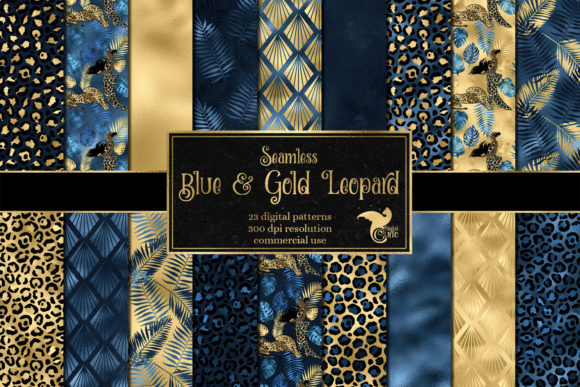
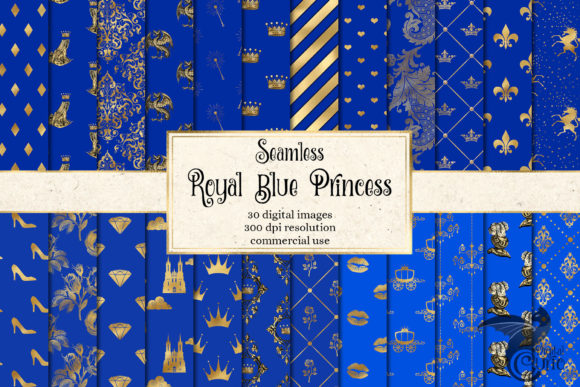
If you are searching for a background that balances bold elegance with playful pattern, royal blue and gold leopard digital paper might be exactly what you need. This set of vivid digital papers features ornate, princess-style motifs in a regal color combination. Each image measures 12 x 12 inches (30.5 x 30.5 cm) at 300 dpi, and the files are seamless, meaning you can tile them across fabrics, large prints, or web backgrounds without visible seams. The pack includes 30 seamless JPG files, each 3600 x 3600 pixels, giving you plenty of variety for a wide range of projects.
At first glance, these papers might seem straightforward: choose a pattern, download, and use. But there are several common mistakes that can turn a promising design resource into a source of frustration. Whether you are a small business owner designing product packaging, a blogger creating social media graphics, or a hobbyist working on a scrapbook, understanding what to look for before you buy and how to use these files correctly will save you time, money, and disappointment.
Mistake One: Assuming All Digital Papers Are Print Ready Without Checking Specs
A frequent oversight is grabbing a digital paper pack and immediately placing it into a design without verifying that the resolution and dimensions match your output needs. The royal blue and gold leopard digital paper in this set is created at 300 dpi, which is the standard for high-quality printing. However, 300 dpi at 12 x 12 inches means the file is exactly 3600 x 3600 pixels. If you try to stretch that image to cover a 24 x 24 inch print at the same resolution, you will lose clarity and introduce softness or pixelation.
How this affects your work: blurry prints, jagged edges on leopard spots, and a general lack of crispness that undermines the ornate, premium feel of the design. The result looks amateur, no matter how beautiful the original pattern is.
What to do instead: Before you download, know your final output size. If you need a larger print, plan to tile the seamless pattern across multiple sheets or use the file at its native size for smaller projects like card making, scrapbook pages, or product labels. Because these papers are seamless, you can tile them in software like Photoshop, Illustrator, or even Canva, repeating the pattern across a larger canvas without visible breaks. Just ensure your software handles the repetition correctly and that your final resolution remains at 300 dpi for print.
Mistake Two: Overlooking Color Consistency Between Screen and Print
Royal blue and gold is a striking combination, but what you see on your monitor may not match what comes out of your printer. The blue might appear deeper or more muted, and the gold could shift toward yellow or green. This is one of the most common disappointments with digital papers, especially when the design includes metallic or shimmering tones like gold.
How this affects your results: A project that looked luxurious on screen can feel flat or mismatched in print. If you are selling products, inconsistent color undermines your brand and leads to customer complaints or returns.
What to do instead: Before committing to a large print run, run a small test print on the paper or material you plan to use. Check that your monitor is calibrated or at least compare the printed paper against a known reference. If you are designing for web use, remember that screens display in RGB while commercial printing uses CMYK. The JPG files in this pack are likely RGB, which is fine for web and many home printers, but if you send them to a professional printer, ask whether they need a CMYK conversion. Many printers accept RGB files and convert them, but the conversion can shift colors. Request a proof before printing to verify the royal blue and gold appear as intended.
Mistake Three: Not Verifying That the Pattern Is Truly Seamless
The product description states these papers are seamless, which means you can tile them repeatedly without visible edges. However, not all digital papers labeled seamless are created equal. Some have obvious repeats, mismatched edges, or motifs that cut off awkwardly at the border.
How this affects your usability: If the seamless join is poorly executed, your fabric print, wallpaper, or website background will show a visible grid or line where the pattern repeats. This breaks the illusion of a continuous design and looks unprofessional.
What to do instead: When you receive the files, do a quick test. Open one in your editing software, tile it across a large canvas, and look for any obvious seams or repeating artifacts. Zoom in and out. If you see problems, contact the seller before using the pattern in a finished project. With a reputable set like this one, the seamless quality should hold up, but it is always worth confirming. If you need to adjust the tiling yourself, tools like Photoshop’s Offset filter can help you refine the repeat, but starting with a well-made file saves you that extra work.
Mistake Four: Ignoring the Scale of the Pattern for Your Project
Leopard prints vary widely in scale. Some have large, bold spots that dominate a surface, while others use smaller, more delicate motifs. The royal blue and gold leopard digital paper here includes ornate princess-style patterns, which likely means the leopard elements are woven into a decorative, elegant layout rather than a purely wild animal print. The scale of the pattern matters enormously depending on what you are designing.
How this affects your design: A large-scale pattern on a small object like a phone case or gift tag can lose its detail or look overwhelming. On the other hand, a small-scale pattern on a large surface like a poster or wrapping paper might look too busy or repetitive.
What to do instead: Before downloading, look at sample images or a preview that shows the pattern at a recognizable scale. If the listing includes a detail shot, examine how large the leopard spots and gold accents are relative to the 12 x 12 inch frame. If you are designing for a small product, you might want a pattern that reads clearly at a smaller size. For large surfaces, you can use the pattern as-is or scale it up slightly in your design software, as long as you maintain resolution. Because the files are 3600 x 3600 pixels, you have some flexibility to scale down without losing quality, but scaling up beyond 100% will degrade sharpness.
Mistake Five: Forgetting to Check Licensing for Commercial Use
Many digital paper packs come with restrictions on how you can use them, especially if you plan to sell products featuring the design. This includes printed items like stickers, fabric, packaging, or digital downloads. Some licenses limit the number of copies you can produce, require credit to the designer, or prohibit using the pattern in logotype or branding.
How this affects your business: Using a pattern in a way that violates the license can lead to takedown notices, loss of sales, or even legal action. It also damages your reputation if you are found using assets without proper rights.
What to do instead: Read the license terms before you purchase. Look for information on commercial use, number of products allowed, and whether you need to purchase an extended license for mass production or merchandise. If the shop does not display these details, message the seller to clarify. Keep a copy of the license for your records. If you are a small business owner, treating digital assets with the same care as physical inventory will protect your brand and your income.
Mistake Six: Downloading Only One Color Scheme Without Checking Alternatives
The listing mentions that this design pack is available in more color schemes in the shop. That is easy to overlook when you have found a pattern you like. But the same ornate leopard motif in a different palette might suit a different project or client better.
How this affects your efficiency: You might finish a design in royal blue and gold, only to realize that another color variant would have matched your brand guidelines or a customer’s request more closely. You then either rework the design or purchase an additional pack later, costing extra time and money.
What to do instead: Before you finalize your purchase, browse the shop for other colorways of this same pattern. If the shop offers a bundle or a discount for multiple packs, that can be a smart investment if you work with varied themes. Even if you only need one scheme now, knowing what else is available helps you plan future projects. Bookmark the shop so you can return if a need arises later.
Mistake Seven: Not Planning for File Format and Organization
The files are JPG format at 300 dpi. JPG is widely compatible, but it uses lossy compression, which means every time you save and reopen the file, you lose a small amount of detail. For professional printing or repeated editing, a lossless format like PNG or TIFF is often preferred. However, JPG files are smaller and easier to share, which is a trade-off.
How this affects your workflow: If you edit and re-save a JPG multiple times, you may introduce visible artifacts, especially in areas of flat color or fine detail like the gold leopard spots. Over time, the file quality degrades.
What to do instead: When you receive the files, make a master copy that you do not edit. Keep that original JPG as a backup. For any project that requires editing, duplicate the file and work on the copy. Save your working file in a lossless format like PSD (Photoshop), AI (Illustrator), or PNG. This preserves the quality of the royal blue and gold paper throughout your design process. Also, organize your files by project or color scheme so you can find them quickly. With 30 patterns in this pack alone, good file management saves you time.
Practical Checklist Before You Use Royal Blue and Gold Leopard Digital Paper
To help you avoid the most common pitfalls, here is a quick checklist to run through before you open the files:
- Confirm your project’s final size and resolution. Will 12 x 12 inches at 300 dpi cover your needs, or do you need to tile the seamless pattern?
- Test print a small sample on your intended material to check color and clarity.
- Verify the seamless tiling works correctly in your design software.
- Assess the pattern scale against your product or surface size.
- Read the license to ensure your intended use is allowed.
- Check the shop for alternative color schemes that might be a better fit.
- Make a master copy of each JPG file and organize your downloads.
Taking these steps takes only a few minutes but can prevent hours of rework and frustration.
Making the Most of These Digital Papers
Royal blue and gold leopard digital paper is a versatile design resource when used thoughtfully. The seamless format opens up possibilities that go beyond standard scrapbooking or card making. Consider using it as a repeating background for your website or social media graphics, as a pattern for gift wrap, or as an accent in fabric design for pillows or bags. The ornate princess style pairs well with simple typography, solid color blocks, or minimalist layouts that let the pattern shine.
If you are a digital creator or small business owner, this type of paper can differentiate your products from generic backgrounds. The key is to treat it as a professional asset, not just a pretty downloaded file. Check the specs, test your output, and plan your design with the pattern’s scale and color in mind. When you do, the result will look cohesive, polished, and intentional.
Before you buy, take a moment to explore the shop for other color schemes that might expand your creative options. And once you have the files, run a quick tiling test and a small print sample before committing to a full project. That simple habit will save you money, time, and potential disappointment.
Digital papers are a powerful tool in any creator’s toolkit. By understanding what you are getting and how to use it correctly, you ensure that the royal blue and gold leopard pattern works for you, not against you. Approach the download with the same care you would any design asset, and your projects will reflect that attention to detail.