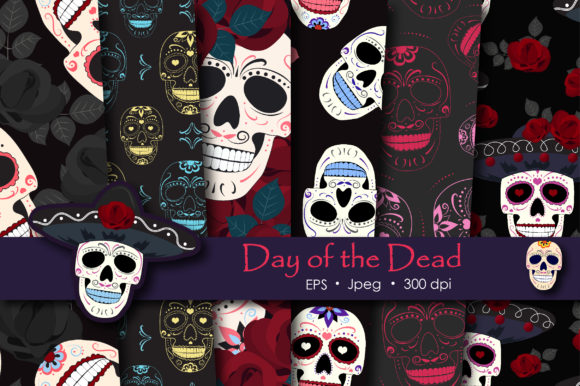
Day of the Dead Sugar Skull Pattern
Understanding the asset and its place in your workflow
A Day of the Dead Sugar Skull Pattern is more than a decorative motif. It is a structured graphic resource built around symmetry, color, and cultural symbolism. When you work with a complete paper pack such as one containing six EPS10 files and six high-resolution JPEGs at 8333 x 8333 pixels, you are handling a versatile toolkit. This format suits professionals who need scalable vector files for large-format printing and raster files for immediate digital use. The pattern itself fits into creative workflows as a repeating background, a focal graphic, or a modular element layered with text and other visuals.
Because the pack includes both vector and raster formats, you can move between design software, print production, and digital publishing without rework. The EPS10 files preserve editable paths, color swatches, and scalable geometry. The JPEG files offer ready-to-use textures and color profiles for quick placement. This dual-format structure reduces friction when you switch between early concept work and final output.
Planning and asset selection
Early in any creative project, you define a visual direction. A Sugar Skull Paper Pack gives you a concrete reference for palette, line weight, and ornament density. Examine the JPEG previews first. They show how the patterns look at full resolution, including how colors blend and how details hold at scale. This saves time later: you can decide whether the pattern works for your medium before opening a vector editor.
When you plan a sticker set or gothic digital paper collection, the EPS10 files allow you to test the pattern against your existing brand colors or project constraints. Open the file, isolate a single motif, and adjust its hue or stroke weight. This upfront adjustment means your final assets feel integrated rather than pasted.
Preparation for different output destinations
- Print production: The 8333 x 8333 px resolution supports large sheets up to poster size. Prepare crop marks and bleed settings before importing the pattern into your layout software.
- Digital products: Resample the JPEG files to 300 dpi for planner stickers or social media templates. The high source resolution prevents quality loss during downscaling.
- Gift packaging: Test the pattern on a mock-up at actual size. Because sugar skull graphics have high contrast, check that fold lines and cuts do not interrupt key visual elements.
Working with vector files in your design pipeline
The EPS10 format works natively in Adobe Illustrator, Affinity Designer, CorelDRAW, and Inkscape. Open the file and you find organized layers, named swatches, and grouped elements. This structure matters when you need to repurpose the pattern across multiple deliverables. For a party decor set, you might stretch the pattern across a banner, but for a scrapbooking page, you tile it at a smaller scale.
Do not flatten the vector file until your layout is final. Keep the pattern editable to adjust spacing, rotation, or individual elements. For example, if you use the skull graphic as a standalone focal point, ungroup the motif, delete the background, and export it as a transparent PNG. This flexibility reduces the need to create separate assets from scratch.
JPEG files for rapid composition
When you work under a tight deadline, the six JPEG files serve as immediate placeholders or final textures. Drag them into Canva, Photoshop, or even presentation software like Google Slides. Because they are already 8333 px wide, they fit most digital canvases without stretching. For social media carousels, crop the JPEG to 1080 x 1080 px and adjust brightness or contrast to match your brand overlay.
Scrapbooking and planner stickers
For physical scrapbooking, print the JPEG patterns on adhesive paper or lightweight cardstock. The high resolution means the print does not show pixelation even at A4 size. Use the skull graphic as a centerpiece and the pattern as a border strip. For digital planners, import the pattern as a background layer and place transparent sticker elements on top. The vector files let you scale the skull down to a weekly spread icon without losing detail.
Gift box wrapping and party decor
Gift wrapping benefits from the repeatability of the pattern. Open the EPS10 file, set the pattern tile to your box dimension, and print on kraft paper or matte sticker sheets. For party decor, create bunting, table runners, or cupcake toppers. Because the pack includes multiple file versions, you can assign different color variations to different items while keeping a unified look.
Gothic digital paper and commercial products
If you run an Etsy store or sell design assets, the sugar skull pattern works as a stand-alone digital paper pack or as part of themed bundles. Prepare a preview collage using the JPEG files so customers see the texture and color depth. For wholesale printing, supply the EPS10 files to your printer so they can scale the pattern without re-encoding. The 8333 px resolution also allows you to sell large-format wall art that buyers can print at home.
Compatibility with tools and platforms
The EPS10 files open in any vector editor that supports PostScript. If you use iPad apps like Procreate or Affinity Designer, import the JPEG files as layers and use the pattern as a clipping mask. For web use, convert the pattern to a seamless CSS background by exporting a small tile from the vector file. This approach keeps page load times low while preserving the visual identity.
When you collaborate with a team, share the EPS10 files via cloud storage so editors can access the original layers. The JPEG files are safe for clients who do not have vector software. They can place the pattern into Canva, PowerPoint, or even word processors for basic mock-ups.
File management best practices
- Store the ZIP archive in a master assets folder named by theme and date.
- Extract the files into subfolders: one for vectors, one for raster, and one for preview thumbs.
- Rename each file with a convention such as skull-pattern_01.eps and skull-pattern_01_rgb.jpg to avoid confusion during batch processing.
- Keep a document with notes on color space, resolution, and typical use cases for each file.
Reusing the pattern across seasons and projects
A single sugar skull pattern pack can serve multiple occasions. For Day of the Dead itself, use the full-color version. For Halloween or gothic-themed projects, desaturate the pattern or overlay it with a dark gradient. For a Dia de los Muertos planner, combine the pattern with neutral background textures to maintain readability. Because the EPS10 files preserve vector paths, you can recolor every element in minutes. This reuse value makes the initial file preparation worthwhile.
Quality control and output consistency
Before delivering a final file, test the pattern at the actual output size. Check that the 8333 px JPEG does not introduce compression artifacts when printed at 300 dpi. In the vector file, verify that all strokes are aligned and that no stray anchor points exist. If you sell the pattern as a commercial asset, include a note about the color profile (sRGB for screen, CMYK for print) so buyers know how to handle conversion.
For sticker production, do a test cut with your plotter software. The skull graphic has fine details around the teeth and eyes. If you use a cutting machine, set the cut line to follow a simplified outline rather than every contour. This prevents thin paper from tearing and keeps the final sticker clean.
Adapting the pattern for different skill levels
A beginner can open a JPEG file, place it on a page, and create an immediate result. An experienced designer will dive into the EPS10 layers to extract individual elements, rebuild the pattern in a custom grid, or combine it with other vector assets. The pack supports both approaches without forcing one over the other. If you teach a class on digital paper design, the files serve as case studies for pattern construction. Students can analyze how the motifs repeat and how color harmony is achieved.
Practical observations from real use
The pattern holds up best when you do not force it into every dimension. Use it as an accent in small projects and as a full background in large ones. If the skull graphic competes with text, reduce its opacity or place it in a masked area. For planner stickers, the pattern works well on the cover page or as a weekly spread background, but daily entries benefit from simpler layouts. This balance keeps your project functional while still featuring the design.
Because the files are large, keep your working file on a local drive rather than a cloud sync folder during active editing. This avoids lag when saving or rendering. After production, archive the source files and export only the final outputs for distribution.
Putting the package into your regular workflow
Integrate the Day of the Dead Sugar Skull Pattern into your routine by assigning it a role in your asset library. Treat it as a pluggable resource: extract the EPS10 files when you need scalability and the JPEG files when you need speed. Over time, you will develop shortcuts for recoloring, scaling, and positioning the pattern based on the project type. This repeatability is what turns a one-time purchase into a long-term tool. Whether you produce scrapbooking kits, party decor, planner stickers, or digital paper sets, the pack supports both the iterative work of design and the final demands of production.